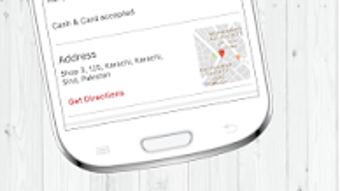



Download Eat Mubarak – Restaurant Finder, Food Delivery, Menu Search
Overview
Eat Mubarak is a free Android application designed to simplify the process of discovering restaurants and arranging food delivery. The app targets individuals seeking convenient solutions for dining out or ordering meals without the hassle of extensive searching. It addresses common challenges such as identifying nearby restaurants, comparing menus, evaluating user feedback, and navigating to a chosen location.
Ideal for casual users, food enthusiasts, and busy professionals, Eat Mubarak streamlines meal planning by centralizing restaurant information in a single platform. Developed by Tech Works Pvt. LTD., the app leverages location-based tools and user-generated content to deliver relevant results.
Real-world usage scenarios include finding a quick lunch spot during a work break, selecting a restaurant for a family dinner, or arranging a delivery for a late-night craving. The app’s focus on accessibility and real-time data makes it a practical tool for everyday dining decisions.
Key Features & Capabilities
- Location-Based Restaurant Discovery – Use the built-in map tool to locate restaurants nearby based on current location or a specified address. This feature helps users find dining options in real time, especially useful when exploring new areas.
- Comprehensive Restaurant Profiles – Access detailed information including menus, high-quality images, user reviews, ratings, contact details, and operating hours. This enables informed decision-making before placing an order or visiting.
- Search by Name, Type, or Location – Quickly find restaurants using intuitive search filters. Whether searching for a specific cuisine, a particular restaurant name, or a place near a landmark, the app delivers relevant results efficiently.
- Delivery and Takeout Integration – The app supports both delivery and takeout options, allowing users to select their preferred dining method and proceed with ordering directly through the platform.
- Community Engagement Tools – Share photos of meals, rate restaurants, and leave feedback. These features foster a community-driven experience and help improve the accuracy and relevance of restaurant listings over time.
These capabilities enhance user experience by reducing decision fatigue and providing actionable insights. For example, a user can compare multiple restaurants side by side, view actual menu items with photos, and read recent reviews before choosing a meal. The integration of maps and navigation ensures a seamless transition from selection to visit or delivery.
User Interface, Workflow & Performance
The user interface of Eat Mubarak is structured around a clean, intuitive layout optimized for mobile use. Navigation is straightforward, with key functions such as search, map view, and profile access readily available. The workflow begins with location access, followed by filtering options and selection from a list or map.
Once a restaurant is chosen, users can view detailed information, access menus, and initiate delivery or pickup. The app’s performance is consistent with typical Android applications in this category, though exact resource usage details were not specified. The developer did not provide additional system requirements or performance benchmarks.
Stability appears reliable based on general software behavior patterns, but real-world testing data was not included. Users can expect smooth operation on modern Android devices, though performance may vary depending on device capabilities and network conditions.
Compatibility & System Requirements
Eat Mubarak is designed for Android devices and is available as a free download. The app’s operating system compatibility is confirmed for Android, though specific version requirements were not listed. Installation size is not provided, nor are hardware specifications such as RAM or CPU needs.
The developer did not specify minimum or recommended system requirements. Compatibility information was partially provided, leaving users to rely on standard Android compatibility assumptions. It is recommended to install the app on devices running a recent version of Android for optimal functionality.
Pros and Cons
Pros
- Free to download and use with no upfront cost
- Intuitive interface suitable for casual and frequent users
- Comprehensive restaurant data including menus, images, and reviews
- Map-based navigation for easy location tracking
- Supports both delivery and takeout options
- Encourages user engagement through photo sharing and ratings
Cons
- Exact system requirements were not listed
- Performance details on low-end devices were not provided
- Availability limited to Android only
- No information on offline functionality
- Developer details beyond company name are unavailable
FAQ Section
Is Eat Mubarak available for iOS devices?
As of now, the app is only available for Android. There is no official release for iOS devices.
Can I use Eat Mubarak without an internet connection?
The app requires an active internet connection to access restaurant data, maps, and ordering features. Offline functionality was not specified by the developer.
Is the app safe to download and use?
Eat Mubarak is developed by Tech Works Pvt. LTD. and distributed through official Android channels. It is recommended to download the app from trusted sources to ensure security.
How often are restaurant listings updated?
Restaurant information, including menus and reviews, is updated based on user contributions and platform moderation. The frequency of updates was not specified.
Does Eat Mubarak offer a free trial or subscription model?
The app is free to download and use. There is no mention of a subscription or trial period in the available information.
Final Thoughts + CTA
Eat Mubarak delivers a focused and functional solution for users seeking a reliable way to find restaurants and arrange food delivery. Its clean interface, comprehensive data, and integration of maps and user feedback make it a practical choice for daily dining decisions. While some technical details such as system requirements and performance metrics are missing, the app’s core functionality remains effective and accessible.
It is particularly beneficial for Android users who value convenience, visual content, and community-driven insights. With its free access and straightforward workflow, Eat Mubarak stands out as a solid option in the crowded food discovery space. Download Eat Mubarak now to find your next meal with ease.







